
PickFresh App
PickFresh, Inc.Shopping
4.128.00 Reviews
- Version
- 1.0.16
- Installs
- 10.00K
- Age Rating
- Teen
Screenshots
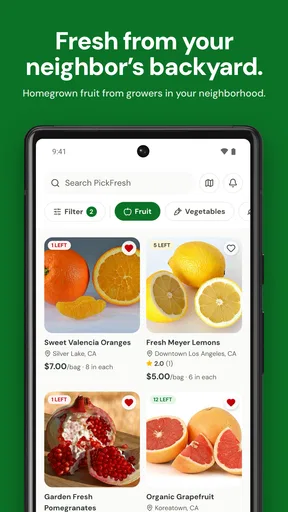
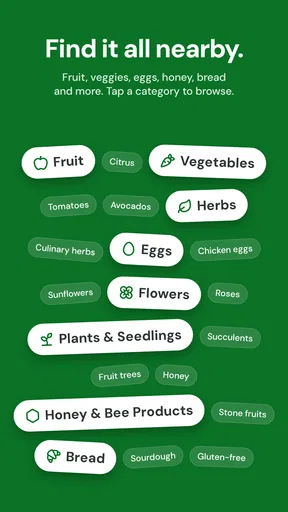
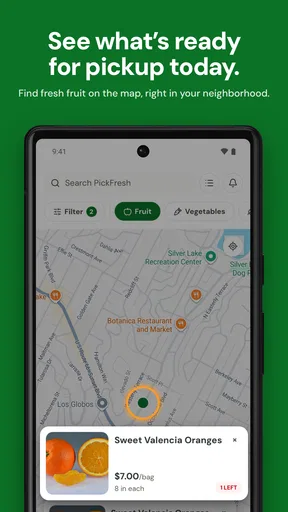
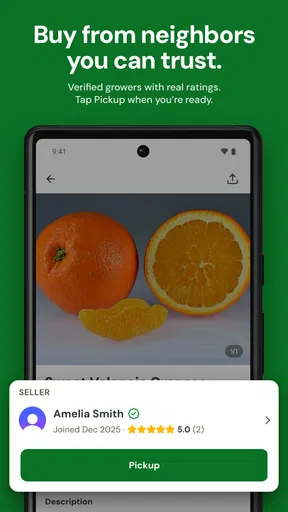
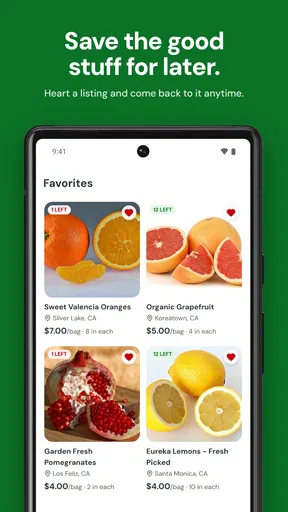
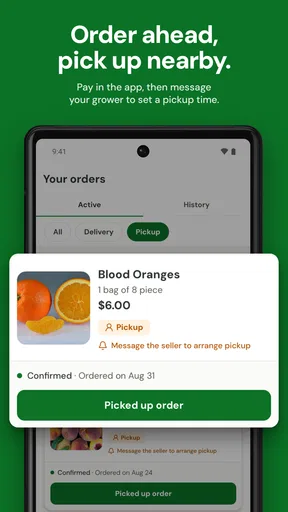
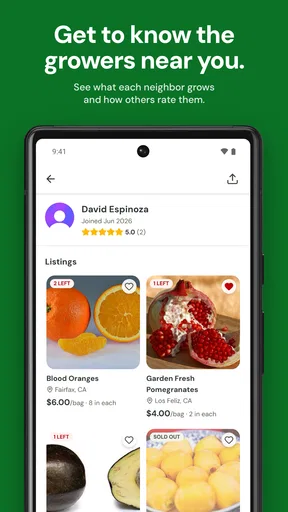
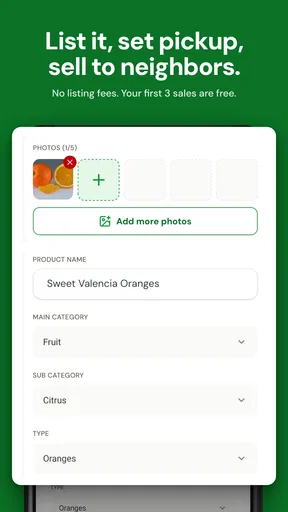
Our Review of PickFresh App
 Analysis by Appyee
If you are trying to buy fruit from nearby sellers without turning the search into a long local errand, PickFresh App is worth a look. I approached it as a first-time shopper rather than as someone already familiar with local marketplaces, and that made its main appeal clear: it is a focused shopping app built around finding fruit locally, not a broad supermarket replacement.
The app comes from PickFresh, Inc. and is free to install. Its audience is marked Teen, while the current release is version 1.0.16 and works on Android 7.0 or later. Those details make it accessible to many older phones, although the experience still depends on how much useful local activity is available in your area.
My overall impression is positive but practical. PickFresh App is most useful when you already care about buying nearby fruit and want a more direct way to explore what may be available. It is less convincing for someone who expects a complete grocery service, guaranteed supermarket-style stock, or a familiar general shopping catalogue.
What to expect from this local fruit marketplace
The first thing to understand is the app’s narrow focus. This is a shopping tool for local fruit, so its value comes from bringing nearby choices into one place. That focus can feel refreshing compared with large shopping apps where fresh produce is buried among household goods, packaged food, delivery services, and unrelated promotions.
I would not treat it as a replacement for every shopping trip. Instead, I see it as a useful second option when freshness, locality, and discovery matter more than having one large basket containing everything. If I only need a few ordinary groceries, a supermarket app may be faster. If I want to investigate local fruit options, this app has a clearer purpose.
The store summary describes it as a local fruit marketplace, and that description is important because it sets the right expectation. The experience is likely to be strongest for people who are willing to browse what is available rather than demanding one fixed product, one familiar brand, or a perfectly predictable catalogue every time they open the app.
That makes the app particularly interesting for several kinds of users. A household looking for fruit for the week may appreciate a dedicated place to check local possibilities. Someone trying to support nearby sellers may prefer this focused approach over a large national retailer. A curious shopper can also use it to compare what appears locally before deciding whether a separate trip is worthwhile.
On the other hand, I would skip it if your priority is a full weekly supermarket order, highly standardized product information, or the fastest possible checkout for a single routine item. The app’s identity is its local fruit focus, and that strength also defines its limits.
The current public reception is encouraging without being overwhelming: it carries a 4.1 average from around 85 ratings, with roughly 28 written reviews and over 10 thousand installs. I read those figures as a sign that the app has attracted real early interest, but not as proof that every town or neighborhood will offer the same depth of choice.
How it differs from ordinary shopping alternatives
Large grocery apps usually win on breadth. They make it easy to add pantry staples, cleaning products, drinks, and fresh food to one order. Their advantage is convenience through consolidation. PickFresh App takes the opposite route by making local fruit the reason to open the app in the first place.
A general marketplace may also give you more familiar filters, established product pages, or predictable delivery routines. A local fruit marketplace can be more useful when the important question is not “Which national brand should I buy?” but “What is available near me, and is it worth choosing today?” That is a different shopping decision, and the app makes more sense when approached that way.
There is also a difference in how I would use it. With a supermarket app, I normally begin with a shopping list and search for exact items. With PickFresh App, I would begin with an intention: find local fruit, inspect the available choices, and then decide what fits my needs. That browse-first habit is one of the most important adjustments for a new user.
Getting through the first setup without overthinking it
After installing the app, I recommend keeping the first session simple. Do not begin by trying to plan a large order or judging the entire service from the opening screen. Your first goal should be to understand how the local marketplace is organized and whether it presents options relevant to where you shop.
Because the app is designed around local discovery, location context is central to the experience. If the app asks you to identify an area, enter it carefully rather than choosing a nearby place just to move forward. A slightly wrong location can make the marketplace feel empty or irrelevant, even when better options may exist closer to your actual neighborhood.
This is one of my practical tips: use the location you would realistically use for a shopping trip, not merely the address that is easiest to type. For a person who works in one area and lives in another, the useful choice may depend on when they plan to shop. Thinking about that before browsing prevents a common mistake—assuming the app has little to offer when the real problem is an unsuitable search area.
Once the initial screens are complete, take a moment to notice how the app presents local fruit choices. Look for the basic path from discovery to selection rather than tapping every available control immediately. A calm first pass helps you learn whether the app expects you to browse sellers, inspect individual fruit listings, or move through another local-shopping flow.
I also suggest deciding what “success” means before you start. For a first session, success does not need to mean completing a large purchase. It can simply mean finding a fruit option that looks relevant, understanding where it comes from within the marketplace, and knowing what you would do next. That smaller target makes the first experience much less intimidating.
The app’s free price removes one barrier to testing it. Still, free installation should not be confused with guaranteed usefulness everywhere. A local marketplace depends on the quality and activity of the area it serves. I would give it a fair trial in the place where I actually shop, then judge it by the relevance of the results rather than by the app’s concept alone.
Your first meaningful action
For a first-time user, the best opening workflow is straightforward: establish the right local context, browse the fruit options, open the item that interests you, and decide whether it fits a real shopping need. This is more useful than wandering through every screen because it tests the app’s central promise in a few minutes.
Imagine that I need fruit for a small family breakfast later in the week. I would open the app with that specific purpose, check the local selection, and compare the options that seem practical for my timing and budget. I would not begin by searching for an entire household order. The point is to see whether the app can help me make one concrete local decision.
That scenario also reveals an important trade-off. A dedicated fruit marketplace may help me notice local possibilities I would not have considered in a standard grocery list. At the same time, I may need to be more flexible about the exact item, seller, or timing. If I require one precise product immediately, a conventional supermarket service could be the safer choice.
My advice is to save or remember the route that led to the useful result. Even without treating the app like a complicated productivity system, noticing which area, category, or browsing step worked best can make the second visit quicker. Local shopping apps reward a little familiarity because the first session is partly about learning how the marketplace is laid out.
Another useful habit is to compare the app’s result with your actual routine, not with an idealized shopping trip. Ask yourself whether you would realistically travel for the option, whether the quantity suits your household, and whether the timing works. The app can surface a possibility, but the final decision still belongs to the shopper.
Where first-time users may become confused
The most likely confusion is expecting the app to behave exactly like a major online supermarket. Its local focus may mean that browsing feels more dependent on place and current availability than on a permanent, identical catalogue. If the selection changes or feels narrower than expected, that does not automatically mean the app is malfunctioning; it may reflect the nature of local shopping.
A second point of friction is the difference between discovering an option and completing a purchase. Seeing a fruit listing that interests you is only one step. You still need to understand the practical details presented in the app and decide whether the arrangement suits you. I would read each screen carefully instead of assuming that every listing follows the same process as a national retailer.
This is where I would avoid rushing. When an app connects shoppers with local choices, the details around availability and collection or fulfillment can matter as much as the fruit itself. If a screen requires a decision, pause and confirm what you are selecting. That small amount of attention is more valuable than tapping quickly and trying to correct an avoidable mistake later.
Users may also wonder whether the app is suitable for a full grocery basket. In my view, it should be treated as a specialized companion rather than an all-purpose replacement. You can use it to explore local fruit, but you may still prefer another service for staples, household supplies, or a single combined delivery.
Another sensible question is whether an older phone can run it. The stated minimum is Android 7.0, so people with devices at that level or newer can consider trying it. Compatibility alone does not guarantee a smooth experience on every handset, but the requirement is not restricted to only the newest Android devices.
People also ask whether the app is appropriate for younger users. Its content rating is Teen, so I would treat it as an app for that age group and above, with normal family judgment about shopping decisions and account use. The rating does not change the app’s basic purpose, but it is useful context when deciding who in a household should manage it.
Small workflow choices that make it more useful
One non-obvious advantage of a focused app is that it can change how you plan. Instead of writing a rigid list first, you can check local fruit possibilities and build a smaller meal or snack plan around what looks practical. This works especially well when you are open to substitutions and want freshness or locality to influence the menu.
A second useful approach is to use it before, rather than during, a rushed shopping trip. Browsing at a calm moment lets you decide whether the local option is worth pursuing. If you wait until you are already hungry or short on time, the app may feel slower simply because you are asking it to solve an urgent problem that a nearby supermarket handles more predictably.
Third, I would use the app as a comparison tool even when I do not complete a purchase immediately. It can help me see whether local fruit shopping fits my routine, especially when I am considering a change from a standard retailer. The insight is not only about finding a product; it is about learning whether the local marketplace model saves me effort in my own area.
There is a trade-off here between discovery and certainty. Local browsing can be more interesting than a fixed catalogue, but it may require patience and flexibility. If you enjoy choosing from what is available, that feels like a benefit. If you want an exact repeat order with no surprises, the same quality may feel inconvenient.
Who should try it, and who should choose something else
I would recommend PickFresh App to a shopper who wants a dedicated way to investigate nearby fruit and is comfortable making decisions from local availability. It is also a reasonable choice for someone who wants to test a specialized marketplace without paying to install it, provided they understand that the real value depends on their location and shopping habits.
It may suit households that buy fruit regularly but do not need a large general-grocery order every time. It can also appeal to people who prefer a more local, discovery-oriented experience over scrolling through a huge retailer catalogue. For those users, the app’s narrow purpose is not a weakness; it keeps the shopping question focused.
I would be more cautious if you need guaranteed stock, a broad product range, or a highly standardized delivery experience. A conventional grocery app is likely better for a precise weekly list, especially when fruit is only one small part of the order. I would also skip this app if you are unwilling to adjust your choices based on what is locally available.
The developer, PickFresh, Inc., has positioned the product around a clear idea rather than trying to make it every kind of shopping app at once. That clarity is welcome, but it means the app should be judged on local fruit discovery, not on features that belong to a different category of service.
My next-step advice after the first visit
After you find one useful option, do not immediately assume you have learned everything the app can do. Return with a different realistic purpose: perhaps fruit for a weekend meal, a smaller household purchase, or a search made from another area where you commonly shop. The goal is to see whether the app remains useful beyond one lucky result.
If the second visit is practical, keep the app as a specialized part of your shopping routine. Use a general retailer when you need a complete basket, and open PickFresh App when local fruit is the main reason for shopping. That division of labor makes more sense to me than forcing one service to handle every kind of purchase.
If the local results do not fit your needs, the fair conclusion is not necessarily that the concept is poor. It may simply be a mismatch between the marketplace and your location, schedule, or expectations. In that situation, a regular grocery app or an in-person store may save time. The important thing is to recognize the mismatch early rather than repeatedly expecting a specialized tool to behave like a general one.
Overall, I found the app easiest to appreciate when I used it with a specific local-fruit goal and a little flexibility. Its strongest quality is the focused path from nearby discovery to a real shopping decision. Its main limitation is equally clear: the experience is not designed to replace the breadth and predictability of a full supermarket service.
For a free shopping app with a clear local purpose, that is a fair proposition. I would recommend giving it a focused first try, using your real shopping area and one modest goal. If it produces a useful option without adding extra effort, it can become a handy companion for fruit shopping. If your needs are broader or more exact, keep a general alternative ready.
Verdict
Strengths of PickFresh App
- Quickly browse fresh produce and grocery options in one place.
- Convenient ordering process saves time compared with visiting multiple stores.
- Useful for planning purchases around your preferred delivery or pickup time.
- Product categories make it easier to find everyday essentials.
- Helpful for users who want groceries brought directly to their door.
Limitations of PickFresh App
- Availability and delivery coverage may vary by location.
- Fresh item quality can differ depending on store handling and transport.
- Delivery fees or minimum order requirements may increase the total cost.
- Popular products may sell out before the order is completed.
- Customer support response times may vary during busy periods.
Similar Picks in This Category
View All
SHEIN-Shopping Online
Roadget Business PTE. LTD.4.8

Amazon Shopping
Amazon Mobile LLC4.4


Mercado Libre: Compras online
Mercado Libre4.8

Wish: Shop and Save
Wish US Holdings LLC4.7

Alibaba.com - B2B marketplace
Alibaba Mobile4.4
Frequently Asked Questions
What is the PickFresh app used for?
PickFresh is designed to make grocery shopping more convenient by helping users browse available products, choose fresh items, and place orders through a mobile device. Depending on the service area, the app may support home delivery or pickup options. Its usefulness can vary by location, so check whether PickFresh operates in your city before downloading.
Is PickFresh available in every city or country?
No, PickFresh may only be available in selected locations and service areas. Product availability, delivery coverage, pickup points, delivery times, and supported stores can differ depending on where you live. Before creating an order, allow the app to check your location or enter your address manually to confirm whether the service is accessible in your area.
Can I choose delivery times and track my PickFresh order?
PickFresh may provide delivery or pickup scheduling during checkout, although the available time slots depend on inventory, store capacity, and your location. After placing an order, users can generally review its status in the app and may receive updates as it is prepared or dispatched. Exact tracking features can vary by market and order type.
What payment methods does PickFresh accept?
The payment methods available in PickFresh can depend on your region, account settings, and the selected store or fulfillment option. The app may support common digital payment methods, bank cards, or other checkout options shown during the ordering process. Review the final total carefully, including delivery charges, service fees, taxes, and any substitutions.
What happens if an item is unavailable or arrives damaged?
Fresh products can sometimes become unavailable after an order is submitted, and the app or store may offer substitutions, remove the item, or adjust the final price. If products arrive damaged, missing, or below your expectations, use the order details or help section to report the problem promptly. Keep your order information and, when appropriate, photographs of the issue.
